Monday, February 12, 2007

Push Email via WM5 ActiveSync

Push email is used to describe the ability to deliver (or push) messages to clients as they arrive at the mail server. Compare this against the traditional email — you need to fire up your favorite email client like Outlook, Eudora or web-based Yahoo/Hotmail in order to know whether you have email. With the advent of web-connected PDAs and PocketPCs, push technology provides the capability to deliver your email wherever you are — a feature which made Blackberry synonymous to push email.

The success of Blackberry has spurred the challenge to provide a similar experience in other portable devices. For Windows-powered mobile devices, here’s how to set it up fast:

  • Create a mail2web LIVE account. The mail2web service provides free accounts on Exchange servers which includes ActiveSync support.
  • Start ActiveSync in your Windows Mobile device and configure Server. Set server address as mobile.exchange@mail2web.com and provide your mail2web user-id and password. Use ad2 as the domain.


The direct push feature not only delivers email but also calendar, contacts, and tasks as well. Direct push is implemented by means of the Messaging and Security Feature Pack for Windows Mobile 5.0. Check your phone vendor for a a possible ROM upgrade in order to enjoy direct push technology.


Sunday, December 10, 2006

PLDT WeROAM - Rough around the EDGEs

PLDT’s WeROAM provides Internet access to computers fitted with the Sierra Wireless PC Card. PLDT provided me with a Aircard® 775 PC Card which is capable of connecting to EDGE and GSM/GPRS networks of Smart Communications. Unlike its newer cousins (Aircard 850/860), the Aircard 775 model does not support HSPDA. According to Sierra Wireless..


The quad-band AirCard 775 offers wireless access to the Internet and corporate networks at speeds up to three times faster than on GPRS networks (typical 100-130 kbps, maximum at 216 kbps).


Installation was a breeze… just run the setup program contained in the CD before inserting your PC Card. After inserting the AirCard, the newly installed Watcher program pops up and prompts you to connect to the Smart network.


Connecting was another matter… I was unable to connect to the network or if I did, I was disconnected right away. I did this for an hour or so until I started to doubt that the software did not install properly at all. So what I did was to remove the software and install it all over again. And guess what, still the same. Maybe I have a defective card.. hmmmm.


Not too fast… I popped up the laptop the next day and pushed the CONNECT button. Goodness gracious.. I got the much-anticipated network icon in my taskbar. EDGE connectivity, at last! And a very strong signal at that! 5 green bars all the way!


Well, I rejoiced too soon…


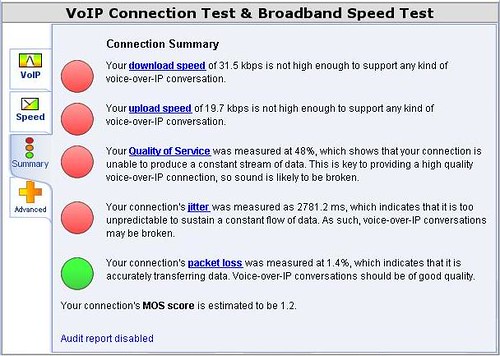
Although the SpeakEasy bandwidth meter clocked around 110 kbps download speed, the upload speed was a dismal 15 kbps at best. The bandwidth tester from pldtplay.com gave erratic readings from a low of 29.2 kbps to a high of 123.3 kbps download speed (no upload metric). Lastly, connection quality as measured by VisualWare is not adequate enough to support VOIP applications, giving it a Mean Opinion Score of 1.2 and 1.6 (a VoIP simulation that drops below 3.5 is considered poor quality, a measure of 4.2-4.5 is considered good quality).


When the PLDT-Smart tandem leaves us with so much to hope for, I’m starting to believe that convergence is much farther down the road.

Friday, November 17, 2006

SDHC is SD with High Capacity

SDHC® is the new designation for Secure Digital cards exceeding 2GB in size. The HC series adheres to the SD Specification Version 2 which allows the cards to reach 32GB in size.


Aside from the larger storage capacity, SDHC cards offer optimized recording performance with support for FAT32 file formats. The SD Association has defined 3 speed classes in order to identify speed and performance capabilities of the SD/SDHC cards and the host products. The SD speed Class Ratings specify the minimum sustained write speed for SDHC cards, as follows:

Class 2 : 2 MB/s
Class 4 : 4 MB/s
Class 6 : 6 MB/s*

SDHC-compliant cards have both the SDHC and Speed Class logo in their packaging.


Though SDHC cards are identical in size with the standard SD card, only SDHC-compatible products will be able to accept the newer SDHC cards. SDHC host products can use both SD and SDHC memory cards, while SD host products can use only SD memory cards of 2GB or lesser size.

*1 megabyte (MB) = 1 million bytes
Note: SDHC, the SDHC logo and SD are trademarks

Sunday, March 5, 2006

Samsung / Motorola phones - microSD / Transflash Compatibility

Except for the names, the microSD and Transflash are identical. On 26 February 2004, Transflash (or T-flash) was introduced by Sandisk as the world’s smallest removable flash storage module for mobile phones.

The exceptionally small size of TransFlash (11mm x 15mm x1mm) represents approximately one quarter of the volume of the smallest removable flash cards available on the market today and allows handset manufacturers to incorporate significant amounts of removable storage capacity into their progressively smaller handsets without changing the physical size of the phone.


On 14 March 2005, the SD Card Association announced plans to finalize specifications for a new, super-compact memory card called the microSD, the third form factor in the SD family after SD Memory Card and miniSD. The microSD will be completely compatible with SanDisk’s TransFlash format.


Here are mobile phones that use the microSD:


ManufacturerPhone Model
MotorolaA630 • A780 • A840 • A860 • A1000 • A1010 • C975 • E398 • E815 • E895 • E1000 • E1060 • E1120 • i930 • MPX300 • ROKR • RAZR • SLVR •V635 • V710 • V850 • V975 • V980 • V1000 • V1050 • V1150
SamsungA800 • A920 • A940 • A950 • A970 • D510 • D600 • i300 • X700 • X810 • Z300 • Z500 • Z700

Sunday, February 12, 2006

SE Phone - MS Duo Compatibility

Phone ModelCard
P800 · P900 · S700i · S710a · SO505i · SO505iS · Z1010MS Duo
A5404S · K750i · P910i · P990i · SO506iC · W800i · W900i · V800MS Pro Duo